> For the complete documentation index, see [llms.txt](https://docs.wrangle.io/llms.txt). Markdown versions of documentation pages are available by appending `.md` to page URLs; this page is available as [Markdown](https://docs.wrangle.io/tickets/ai-powered-ticketing/ai-copilot.md).
# AI Copilot
Use AI Copilot to generate ticket replies for your agents based on ticketing data from your inbox.
Once enabled, Wrangle will use context from previously resolved tickets in your inbox to help agents reply from the Wrangle web app. If you have [connected your inbox to Notion](/integrations/notion.md), Wrangle will also use your selected pages to suggest replies for your agents.
To get started, enable Copilot for your inbox
{% hint style="info" %}
When enabling AI Copilot, Wrangle may take up to 24 hours to begin processing content from your inbox.
{% endhint %}
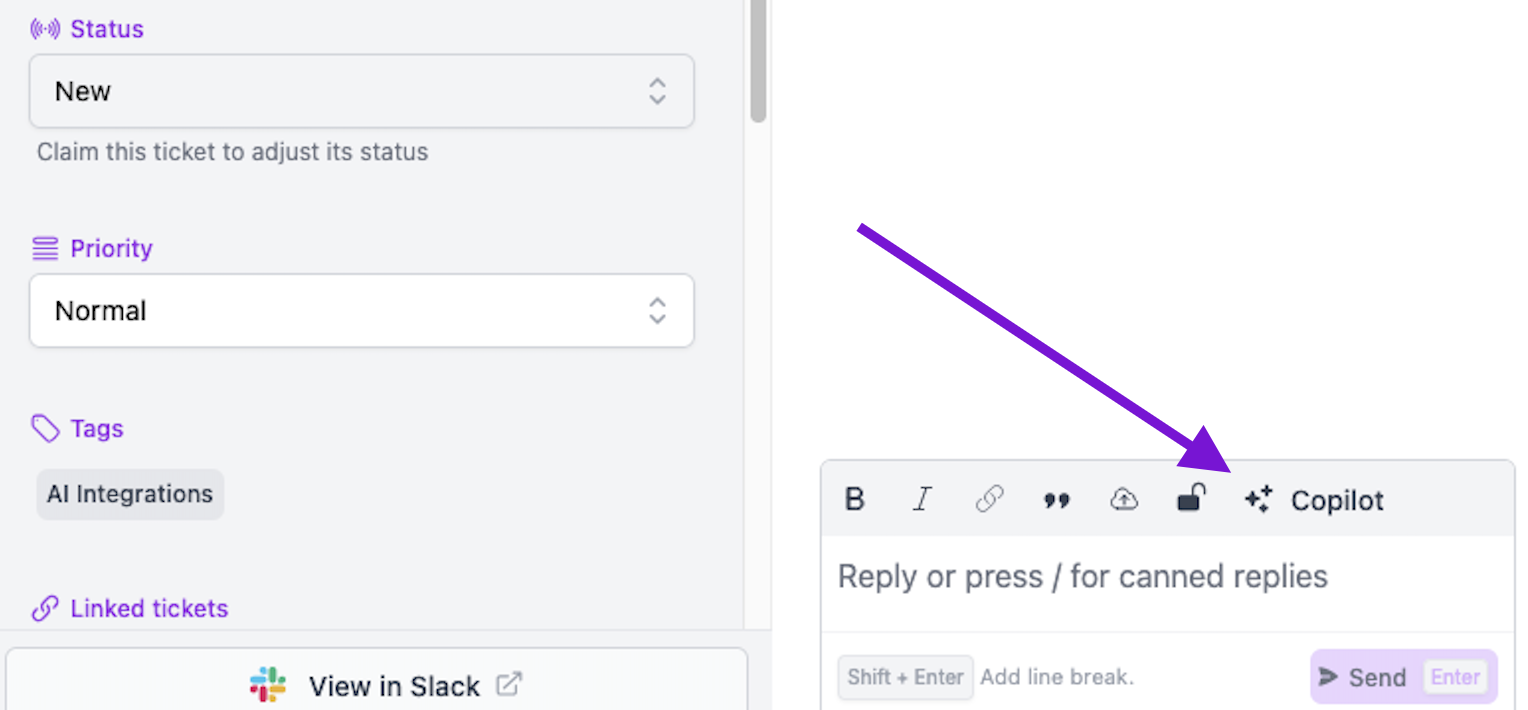
Once AI Copilot has been enabled, you'll see a Copilot button in the Wrangle web app:
AI Copilot button within the ticket
You can also use the `Suggest a reply` shortcut by typing `/`:
Accessing the AI Copilot shortcut within the ticket
You will be able to edit any replies that are generated before you send them, as shown below:
Creating and editing a ticket reply using Wrangle's AI Copilot